Ten Levels Into BreachLab, And The Pipe Was The Lesson
- Linux
- CTF
- Command Line
- BreachLab
- Detection
I have been working through breachlab.org level by level, most recently as
ghost7 and ghost8, keeping a running notes file as I go. Levels 0 through 9 so far. Every level is a small
puzzle that hands you a file or a host and expects you to figure out what it actually is before
you can do anything useful with it.
The part I did not expect is how little of the difficulty was in the tools. I knew what base64
did. I knew what xxd did. Level 7 still took me a while, because knowing two tools is not the
same as knowing how to connect them.
Level 7: the file that lied about itself
The level gives you transmission.dat. A .dat extension tells you nothing, which is the point.
My first move was the obvious one:
base64 -d -i transmission.dat
It came back with invalid input and a spray of binary garbage. Not useless garbage, though.
Sitting in the middle of it was a readable fragment: D3c0d3_0r_D1. So there was base64 in
there somewhere, and the flag was in reach, and my decode was still wrong.
So I stopped guessing and looked at the file instead of at my command:
xxd transmission.dat
That answered it. The file was not binary data. It was a hex dump saved as text, the kind of
output xxd itself produces. So when I ran base64 -d on it, base64 was reading the ASCII of a
hex dump, which is exactly the nonsense it told me it was.
xxd -r reverses a dump back into the bytes it came from:
xxd -r transmission.dat
That printed a clean base64 string. Which is where I got stuck, because I now had the right string and the right tool and could not get the string into the tool.
The two ways I got the pipe wrong
First attempt, I pasted the string as an argument:
base64 <the string>
No such file or directory. Of course: base64 takes a filename as an argument, not data.
It went looking for a file named after my base64 string.
Second attempt, I reached for the pipe but pointed it the wrong way:
base64 | <the string>
That just hung. No output, no error, nothing. I sat there for a second before I hit Ctrl+C. With
nothing to its left producing output, base64 was sitting there reading from my keyboard, waiting
for input I was never going to type.
The working version:
xxd -r transmission.dat | base64 -d
And there it was.
What the pipe actually is
I had used | plenty of times before this without really having a model for it. Writing it down
in my own words is what made it stick:
The pipe is powerful because it runs two commands together, one right after the other, taking the first one's output and feeding it into the next command as if it were a file, then finally outputting the result.
The last clause is the part I had been missing. base64 -d was never waiting for an argument.
It was waiting for stdin. The pipe's whole job is to be that stdin. Once I framed it as
"the left side becomes the right side's file," the failure of both broken attempts became
obvious in hindsight: one handed base64 a filename that did not exist, the other handed it
nothing at all and let it block forever.
Worth saying: I was working through this with an AI assistant open on my laptop, and I told it
up front that I did not want the answer, just help. That turned out to be the right call. If it
had just handed me xxd -r file | base64 -d, I would have copied it, cleared the level, and
learned nothing about stdin.
Level 8: /proc will tell you anything
The next level moved off files entirely. After hopping from ghost7 to ghost8, the job was to
find out what a running daemon was holding. That means /proc.
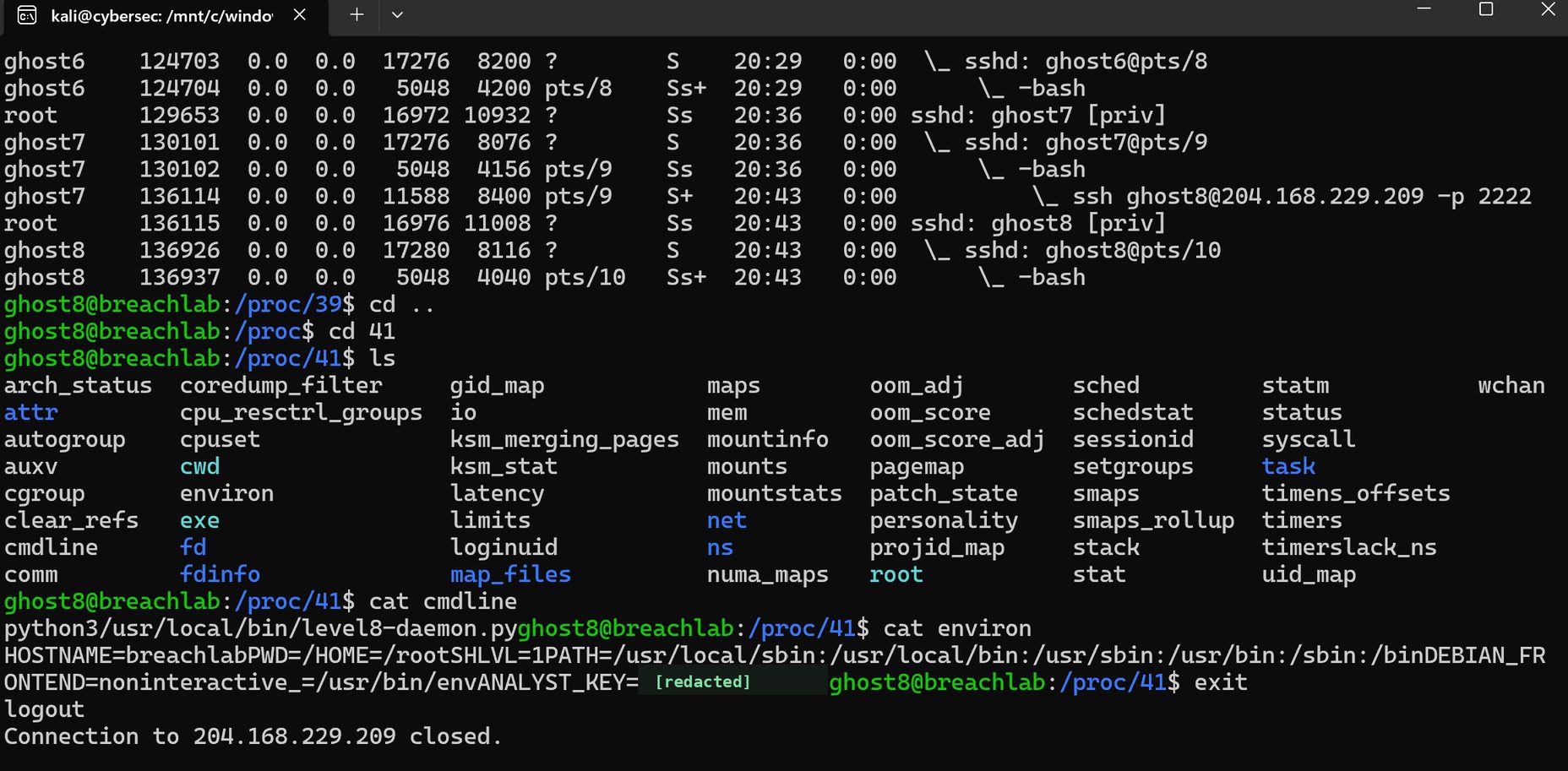
Walking /proc/41 on the level 8 host. Click to open full size. The value of ANALYST_KEY is redacted here on purpose.
ps showed the chain of sessions, including my own ssh ghost8@... -p 2222 hop sitting inside
ghost7's shell. Then I went hunting by PID:
cd /proc/41
ls
cat cmdline
cat environ
cmdline gave me the process for what it was: python3 /usr/local/bin/level8-daemon.py. And
environ gave me its entire environment, one NUL-separated blob, which is why it prints as a
run-on wall of text with no line breaks. Buried in it, sitting next to HOSTNAME and PATH
like it was nothing special, was the key.
The thing to understand about /proc is that none of it is on disk. It is the kernel handing you
live process state through a filesystem interface, so cat and ls work on it exactly like they
work on real files. That is the whole trick: you do not need a debugger or special tooling to read
a running process's arguments and environment. You need cat.
Why that matters if you are on the other side
This is the level that changed how I think about secrets. A secret in an environment variable is
not hidden. It is sitting in /proc/<pid>/environ for the life of the process, readable by that
process's owner and by root. "We pass it as an env var instead of hardcoding it" is better than a
credential in source control, but it is not a secret store, and anything that can run as that
service account can read it with one command.
Which also tells you what to watch for. Reads of /proc/<pid>/environ and /proc/<pid>/cmdline
against a process that is not the reader's own are close to the textbook shape of credential
access, and they are cheap to log. Same reasoning as the pipe: cat is not the threat, and cat
against another process's environ on a production box is.
The notes file
This is roughly what my running cheat sheet looks like now. Nothing exotic, just the set of commands that keep earning their place across levels.
Figure out what a file actually is, before anything else:
file suspicious.bin          # what the header claims it is
strings suspicious.bin       # readable text buried in binary
xxd suspicious.bin           # raw bytes, when file and strings both shrug
xxd -r dump.txt              # reverse a hex dump back into real bytes
Decode chains:
xxd -r transmission.dat | base64 -d
Find something in a pile of text:
cat notes.txt | grep -i password
Look at a running process:
cat /proc/<pid>/cmdline    # what it was actually launched with
cat /proc/<pid>/environ    # its full environment, NUL-separated
Look at a host:
nmap -p- -sV -sC target
-p- for all 65535 ports instead of nmap's default top 1000, -sV to fingerprint what is
actually listening on them, -sC for the default script set.
Talk to a service by hand:
curl -X GET http://target/endpoint
cat payload.txt | nc target 4444
That last one is the pipe lesson again in a different costume. nc reads stdin, so cat piped
into it is how you send a prepared payload to a listening socket without typing it live.
Why I am doing offensive labs at all
I want to work in defensive security. Detection engineering, incident response, SOC. So the reasonable question is why I am spending evenings on a CTF ladder.
Because you cannot write a detection for a technique you have never run yourself. Level 7 is a
toy compared to real tradecraft, but the shape of it is real: an operator hides data in a format
that does not look like data, chains two ordinary utilities together, and the result is a
plaintext secret. Nothing in that chain is malware. xxd, base64, cat, nc. Every one of
them is a normal binary that exists on the box already, and none of them will ever show up on a
signature list.
Which means the thing I would actually be hunting is not the tool. It is the combination: a
process tree where a hex utility feeds a decoder, or a cat feeding a netcat with an outbound
connection, on a host that has no business doing either. That is a behavioral detection, and I
would not have thought to write it if I had not spent an hour getting the pipe backwards myself.
I am also deliberately not publishing the flags, which is why the key is blacked out in that screenshot. Someone else should get to be stuck on these for a while.
Ten levels down. The notes file keeps growing.