Three Routers, Two PCs, And Nothing Configured
- CCNA
- Networking
- Packet Tracer
- Static Routing
A club member and I are both studying for the CCNA, so we have started working through Jeremy's IT Lab labs together instead of separately. This one is Day 11, configuring static routes. We spent about an hour on it.
The reason this lab is worth doing slowly is the line in the instructions:
All devices have NO pre-configurations.
Nothing is set up. No hostnames, no IP addresses, no interfaces turned on, no routes. You build the whole thing from a blank config, which means you cannot skip the part where you actually understand what each piece is for.
The topology
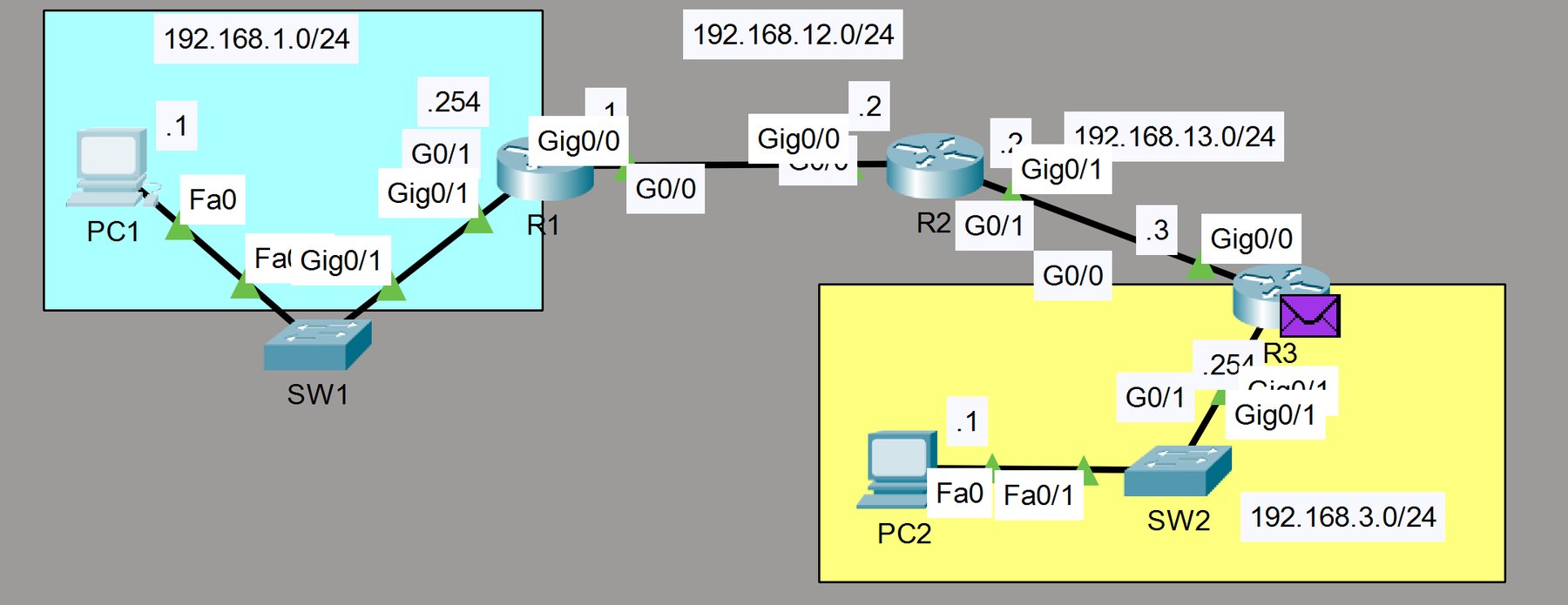
Four networks total:
- 192.168.1.0/24, PC1 and SW1, with R1 as the gateway at
.254 - 192.168.12.0/24, the link from R1
Gig0/0(.1) to R2Gig0/0(.2) - 192.168.13.0/24, the link from R2
Gig0/1(.2) to R3Gig0/0(.3) - 192.168.3.0/24, PC2 and SW2, with R3 as the gateway at
.254
Two addressing habits are baked into that and both are worth stealing. Router interfaces on the
transit links take the host octet matching the router number, so R1 is always .1, R2 is always
.2, R3 is always .3. And LAN gateways sit at .254, at the top of the range, so DHCP or
static hosts can grow from the bottom without ever colliding with the gateway. You can look at any
address in this lab and know what it is without checking the diagram.
Getting addresses on
Standard path into config mode and onto the interfaces:
enable
configure terminal
interface range g0/0 - g0/2
ip address <address> <mask>
no shutdown
interface range is the one worth remembering, since it saves walking into each interface
separately. The part that catches people on real gear and in Packet Tracer alike is no shutdown.
Router interfaces come up administratively down by default, so you can type a perfectly correct
address onto an interface and still have nothing pass through it.
Why static routes are needed at all
A router automatically knows about the networks it is directly connected to, and nothing else. That is the whole problem in one sentence.
R1 is plugged into 192.168.1.0/24 and 192.168.12.0/24, so it knows those two. It has no idea
192.168.3.0/24 exists. When PC1 sends a packet to PC2, R1 looks in its routing table, finds
nothing that matches, and drops it. Not because anything is broken, but because nobody ever told
R1 that network is out there.
A static route is you telling it, by hand:
ip route <destination network> <mask> <next hop>
Which reads as "to reach that network, hand the packet to this neighbor." Each router only needs to know the next step, not the full path to the destination.
Working that out per router is the actual exercise:
- R1 knows 1.0 and 12.0. It needs to be told about 13.0 and 3.0, both via R2 at
192.168.12.2. - R2 knows 12.0 and 13.0, sitting in the middle. It needs 1.0 via R1 at
192.168.12.1, and 3.0 via R3 at192.168.13.3. - R3 knows 13.0 and 3.0. It needs 12.0 and 1.0, both via R2 at
192.168.13.2.
The part that actually teaches you something
A ping is two trips. The echo request goes out and the echo reply has to come back, and the reply takes its own path through the same routing tables.
So you can get the whole forward path right, ping from PC1, and still see nothing. If R3 knows how
to reach 192.168.1.0/24 but R1 was never told about 192.168.3.0/24, the request dies at R1. If
R1 is configured and R3 is not, the request arrives at PC2 just fine and the reply dies on the way
home. Same symptom, opposite cause, and the ping output looks identical either way.
That is why routes get configured in pairs. Every time you add a route in one direction, the matching return route has to exist somewhere, or you have built a one-way street and the test cannot tell you which half is missing.
The other half of the same idea is the default gateway on the PCs, which the lab instructions call out explicitly. A PC with a correct IP and no gateway can talk to its own subnet perfectly and cannot leave it, because it has nowhere to send anything that is not local. Correct address, no path out.
Why this sits next to the security stuff
I am studying for Network+ and CCNA because almost everything I want to do later runs on top of this. A detection that says "host A talked to host B" means nothing unless you know whether those two are even supposed to have a path between them. Segmentation is a routing and access-control question before it is a security product question. Lateral movement, which is the thing I am building SentinelZero to catch, is an attacker using paths that exist on a network.
You cannot reason about paths an attacker took if you have never built one yourself.
Two of us on one lab also turned out to be better than one. Explaining why R2 needs a route back
toward 192.168.1.0/24 is a much better test of whether you understand it than clicking through
and seeing a ping succeed.